Learning System Design #10: End-to-End Encrypted Backup for a Personal Home Server
Tenth part of the “Learning System Design” series! This time — a really juicy one. How do you design an end-to-end encrypted backup system for a personal home server that stores your photos, videos, notes, and a zoo of embedded databases — and do it on an ARM box with 4 GB of RAM, while still letting your phone and laptop read the data without ever trusting the cloud?
Quick disclaimer: I don’t actually own an Umbrel Home. This is a system design exercise — I picked it as the reference device because it’s a real, shipping product with real constraints (ARM, 4 GB RAM, a zoo of self-hosted apps with mixed databases), which makes the problem concrete instead of hand-wavy. This whole series is about reasoning through designs, not about tools I happen to run at home.
So: Umbrel Home is a tiny always-on ARM server that runs Immich for photos, Memos for notes, Vaultwarden for passwords, Rocket.Chat for the family chat, and a dozen other self-hosted apps. Great device. Except: the device itself is the only copy of everything the user cares about. One theft, one failed SSD, one spilled cup of coffee — everything gone.
The question “how should I back this up?” turned out to be a really deep system design problem. So I sketched out the whole thing. Let me walk you through it from the simplest idea to the trickiest one.
The Setup
An Umbrel Home is a real device. Quad-core ARM, ~4 GB RAM, NVMe SSD, always-on Ethernet. It runs self-hosted apps as Docker containers, each with its own data directory on the SSD.
What lives there, roughly:
- Media files — photos, videos, music. Big, mostly immutable, they only grow.
- Notes, chat history, passwords, bookmarks — small, high-churn text.
- Embedded databases — most apps use SQLite (one
.dbfile per app), a few use MongoDB.
So we’re dealing with: a mix of giant append-only blobs and many tiny live databases that are being written to constantly. And the design has to work under a bunch of uncomfortable constraints:
- Zero-knowledge. The cloud never sees plaintext. Not the files, not the file names, not the folder structure.
- Efficient on the edge. No re-uploading the whole 200 GB photo library every time one photo changes. No hogging the CPU while the user is watching something on Plex.
- Restorable from scratch. Device dies tomorrow, user buys a new one, enters a passphrase, and everything comes back.
- Readable from a phone and a browser. Without giving the server any key.
- Time-travel. Restore yesterday. Restore last month. Undelete something deleted two weeks ago.
That’s the brief. Let’s build it up piece by piece.
Step 1: The Big Picture
At a very high level, there are three parties: the home server, the cloud, and the user’s other devices (phone, laptop, browser).
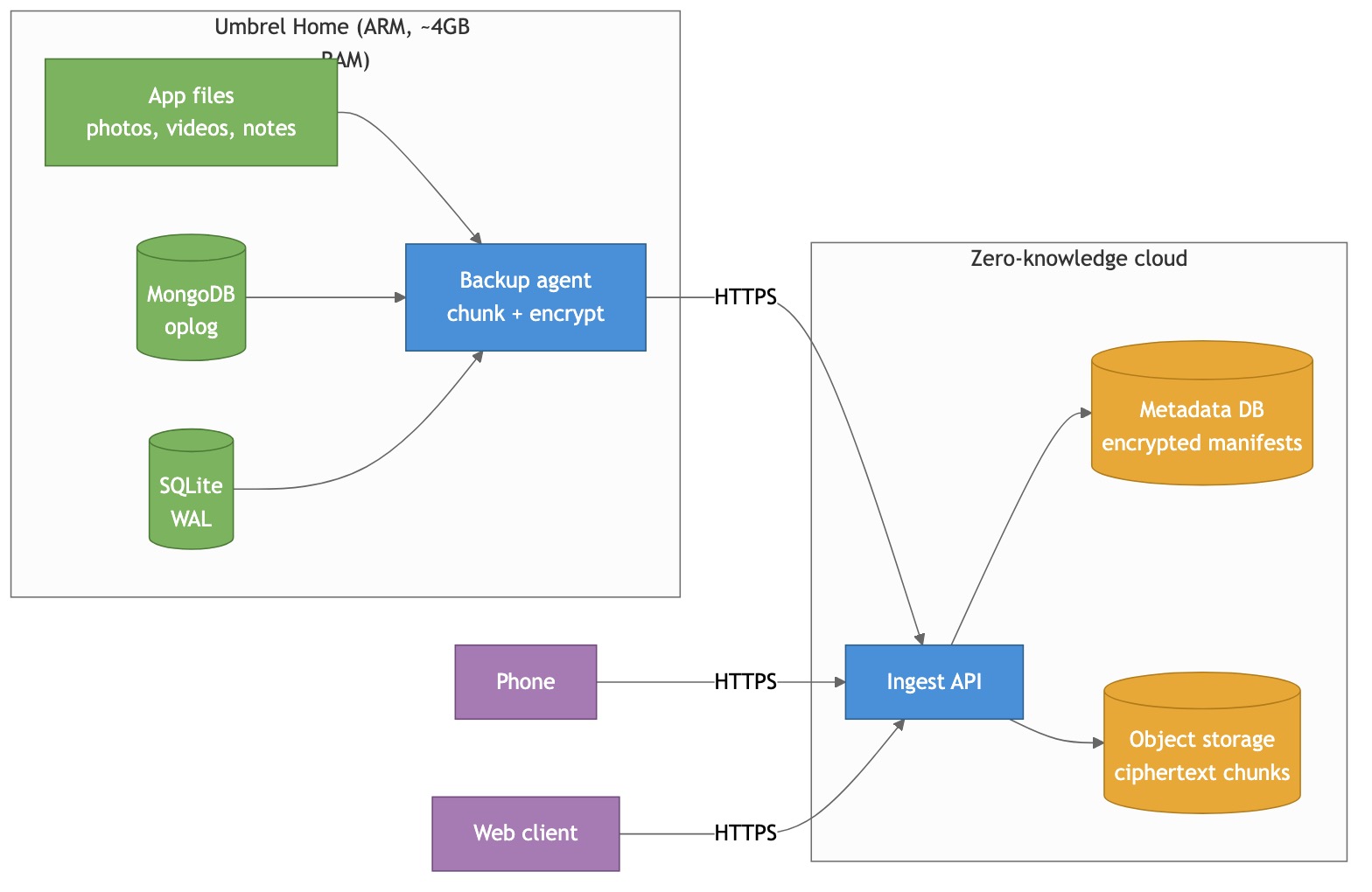
The home server runs a backup agent — a small containerized process that watches all the app data directories, chunks whatever changes, encrypts it on-device, and uploads to the cloud.
The cloud is intentionally dumb. It’s just an ingest API on top of object storage and a metadata DB. It never holds a key. It never decrypts anything. Its only job is to store ciphertext and remember which ciphertext blob belongs to which user.
The phone and web client talk to the same ingest API. They authenticate, they download ciphertext, they decrypt locally. The server never helps them decrypt anything — it can’t.
Everything interesting happens in the agent. So let’s zoom in.
Step 2: Upload Only What’s New — Chunking and Dedup
The first “don’t be naive” problem: when a single photo gets added to a 200 GB library, we can’t re-upload 200 GB. Fine — only upload the new photo. But what about a 20 GB video file where the user trimmed the first 5 seconds? Or a 1 GB SQLite database that flipped two bytes on page 347?
The answer the whole backup industry converged on is content-defined chunking (CDC). Instead of splitting files into fixed 4 MB blocks (which shifts if you insert even one byte near the start), you split them at positions decided by the content itself — wherever a rolling hash of the last few bytes matches a pattern. Insert a byte at the front of a file and only the chunks inside the inserted region change; everything downstream still hits the same content-defined boundaries at the same offsets and dedups perfectly.
This is what restic, borg, duplicacy, and Kopia all do. The specific algorithm we pick is FastCDC (~2× faster than the older Rabin variant on ARM), with ~1 MB average chunks.
Each chunk gets hashed, and the hash becomes the chunk’s address. Before uploading, the agent asks the server “do you already have this hash?” If yes, skip. If no, upload.
The effect: re-importing the same photo is free. A tiny edit to a 10 GB video file is a ~1 MB upload. Uploading a SQLite base snapshot that’s 99% identical to the previous one is nearly free. Exactly the property we want.
I’m keeping this short on purpose — there’s a full standalone deep-dive on CDC (algorithms, parameter tuning, per-data-type behavior, streaming, performance on ARM) if you want to go down the rabbit hole:
https://github.com/sadensmol/learning_system-design/blob/main/cdc-guide.md
Step 3: Encrypt Everything — The Envelope
Now the fun part. The server must never see plaintext, which means the agent encrypts every chunk before upload. But we also want to let multiple devices (phone, web) read the same data. And we want to be able to revoke a lost phone without re-encrypting 200 GB of photos.
Doing this with a single key is a trap. If every chunk is encrypted with “the user’s key,” then revoking a device means re-encrypting everything. No good.
The trick is envelope encryption with three key layers:
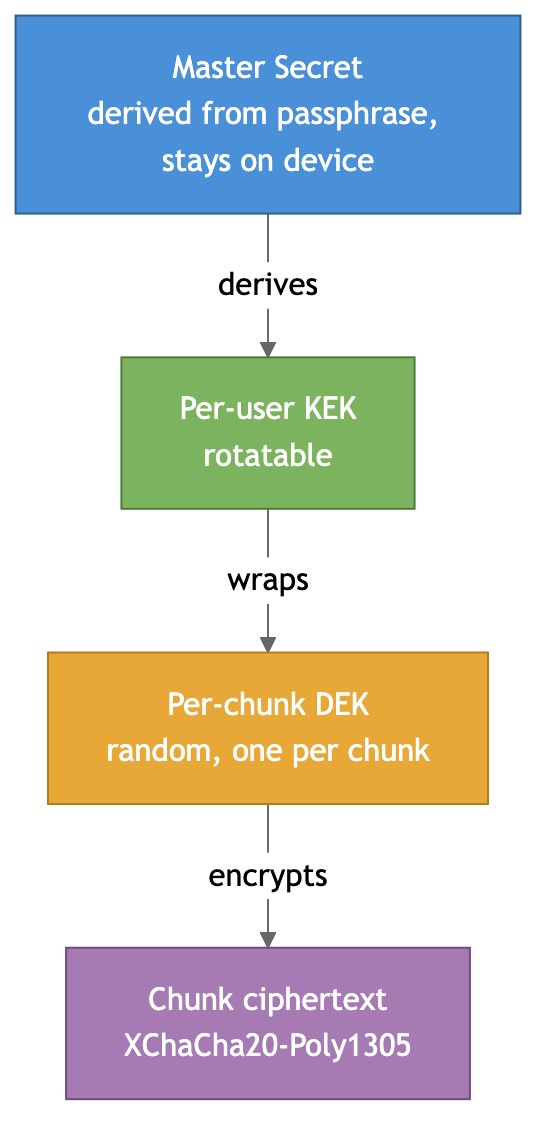
- Master Secret (MS) — derived from the user’s passphrase via a memory-hard KDF (Argon2id) plus a device-generated seed. Never leaves a client device.
- Key Encryption Key (KEK) — one per user. Rotatable. Used to wrap (encrypt) other keys.
- Data Encryption Key (DEK) — a fresh random 256-bit key for every chunk. It’s what actually encrypts the chunk. The DEK itself is stored, wrapped with the KEK, next to the chunk’s reference in the manifest.
Why three layers and not two?
Because rotating a KEK is cheap — you just re-wrap all the DEKs (metadata-only, ~50k rewraps for a 50 GB library, takes seconds). You do not have to re-encrypt the chunks themselves. So device revocation, periodic hygiene rotation, and post-exposure rotation are all affordable.
For the AEAD primitive we use XChaCha20-Poly1305 — safe with random nonces (192-bit nonce space, vs AES-GCM’s hazardous 96-bit), constant-time in software on ARM without AES hardware acceleration. Same cipher WireGuard and libsodium standardized on.
Recovery is the one honest tax: if the user loses all devices and the recovery phrase, the data is gone. That’s the price of zero-knowledge. Server-side escrow would make recovery smooth but would also give the operator a path to plaintext, which breaks the whole promise. Tresorit, iCloud ADP, and Cryptomator all picked the same trade-off for the same reason.
Step 4: Many Devices, One User — Per-Device Key Wrapping
Multi-device is where lazy E2E designs break. The KEK is the shared user secret, so how does a new phone get it without the server seeing it?
Each device generates an X25519 keypair on first launch. Private key stays on the device; public key is registered with the account. The server then stores one wrapped-KEK record per device — same KEK, wrapped separately for each device’s public key.
Pairing a new phone:
- New device generates its keypair, registers its pubkey, gets a short numeric pairing code (6 digits).
- User types the code into an already-trusted device (or scans a QR).
- The trusted device fetches the new pubkey, unwraps the KEK locally, re-wraps it for the new pubkey, uploads the new wrapped-KEK record.
- New device pulls the wrapped-KEK, unwraps it with its own private key, and now holds the KEK in memory.
The server is a middleman that facilitates the transfer but never sees the KEK in the clear. Same idea iCloud Keychain and Keybase use.
Revocation is the symmetric operation: delete the revoked device’s wrapped-KEK, rotate KEK → KEK’, rewrap all DEKs with KEK’, upload new wrapped KEK’s for all still-enrolled devices. Forward secrecy from that moment on. Data the revoked device already downloaded is still readable to it — obviously, fundamentally, unfixably — but any future upload is out of reach.
The web client is the one weird case: browsers have no durable secure key storage. We treat it as less-trusted, hold the KEK only in memory for the session, and re-pair every new session. Signal, ProtonMail, and Tresorit all do some version of this.
Step 5: Live Databases — The Hard Part
Here’s the thing that makes this design actually interesting instead of being “another E2E file backup.”
Most of those apps I mentioned run live embedded databases while you’re using them. You can’t just cp app.db — SQLite in WAL mode has a whole separate journal file, and a naive copy races with the checkpoint process and gives you a corrupted DB. mongodump is fine but it’s a heavyweight full scan every time — no incremental. Neither handles “near-zero RPO” (“you shouldn’t lose the last hour of Memos edits”).
So for each DB family we use its native change log:
- MongoDB — tail the oplog (Mongo’s internal replication log). Every write Mongo does shows up there as a tiny record. Our agent follows it from a persisted cursor, streams the entries through the chunk+encrypt pipeline, and periodically adds a “base snapshot” (a
mongodumpequivalent) so replay isn’t from epoch zero. This is literally how MongoDB Atlas’s own continuous backup works internally. - SQLite — use WAL shipping (Litestream-style). Put the DB in WAL mode, open a read-only connection alongside the app, and ship completed WAL frames as an append-only byte stream. Periodically snapshot a clean base with
VACUUM INTO. This is Ben Johnson’s Litestream pattern, and it’s the only approach that gives near-zero RPO against a live writer without stopping the app.
Both streams ride the same FastCDC + encrypt + upload pipeline as the blobs. No special code path — a WAL frame is just bytes.
Restore = load latest base + replay the change log up to the point in time you want. Mongo’s oplog is idempotent, SQLite’s WAL is idempotent. Both can tolerate overlap, which makes at-least-once delivery safe.
Step 6: The Subtle Bug — Cross-System Consistency
Now the trickiest problem. An Umbrel app like Immich stores photos as files on disk and photo metadata (albums, tags, EXIF) in its SQLite DB. They reference each other.
What happens if we back up the DB every 10 seconds and blobs every minute? On restore at some arbitrary time, the DB could reference a photo chunk that wasn’t yet uploaded when we restored. The restored library would have broken references — a row saying “this album contains photo_42.jpg” with no such file. Silent corruption.
We need point-in-time consistency between DBs and blobs. But we can’t just pause everything to take a clean snapshot — that’s exactly what we said we wouldn’t do on a live device.
The mechanism is a monotonic fence watermark:
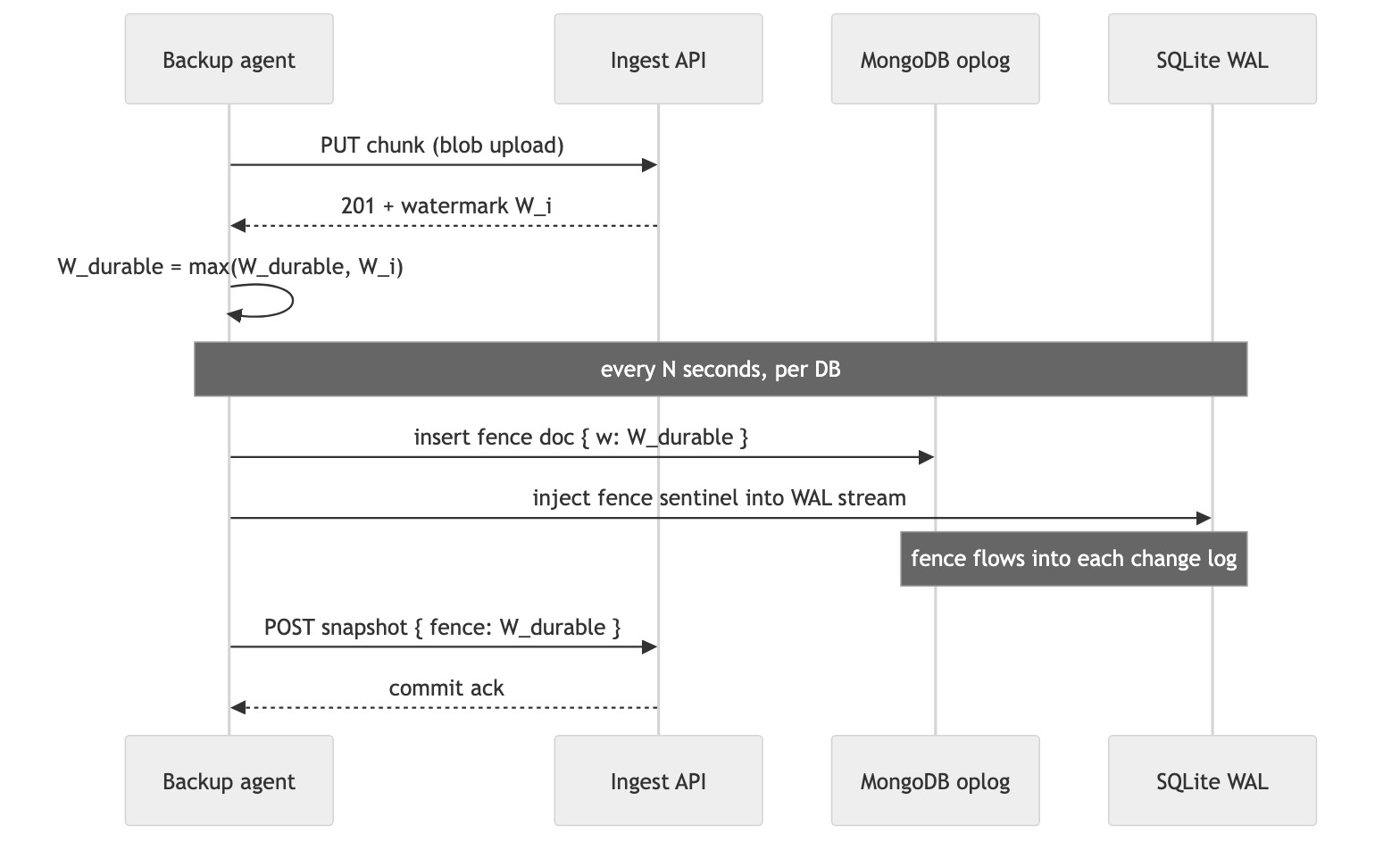
Every successful blob upload returns a monotonic watermark W_i from the server. The agent tracks W_durable = the highest watermark it has seen acknowledged. Every few seconds, per DB, the agent injects the current W_durable into the DB’s change log:
- For Mongo: insert a tiny doc into a reserved
_backup_fencescollection. It goes through the oplog naturally. - For SQLite: inject a sentinel marker directly into the WAL-frame byte stream the shipper is uploading. The sentinel never touches the live DB file — it’s just a marker inside the stream the agent controls.
On restore, replay the DB change log up to the first fence whose watermark is covered by already-restored blobs. By construction, no restored row can reference a blob that wasn’t also restored. No silent corruption. No global lock. Same mechanism for both DB families.
This is really the same idea as Chandy-Lamport snapshot markers in distributed systems or Kafka log watermarks — a marker that flows through the data stream to cut a consistent line across multiple independent producers. Once you see it, you see it everywhere.
Step 7: Versioning and Retention, for Free
The last piece is “how do we time-travel?” The happy surprise: once we have content-addressed chunks, everything about versioning collapses into one primitive.
A snapshot is just an encrypted manifest describing a tree of files and DB states, where each leaf references a chunk by its content hash. Snapshots are immutable — once committed, they never change. A new snapshot just references a new set of chunks plus any reused chunks from earlier snapshots.
Restore as of time T? Pick the latest snapshot ≤ T and hydrate. Restore one file? Same snapshot, just one file’s chunks. Undelete something from two weeks ago? Look at a snapshot from two weeks ago, it still references the chunks.
Retention is then a rule over which snapshots stay pinned:
- Keep everything for the last 7 days.
- Keep daily for 90 days.
- Keep weekly for a year.
- Keep monthly forever.
Classic grandfather-father-son. Every backup tool on the planet converged on it. Garbage collection is mark-and-sweep over chunk references — any chunk not reachable from any pinned snapshot can be deleted, after a small safety delay to avoid racing with a fresh snapshot commit.
Storage tiering is a lifecycle policy on the object store — recent chunks on standard, 30-day-old on infrequent-access, year-old on cold archive. No custom code for it.
Step 8: Restore — The Other Half of the Design
A backup system that can’t restore is a compression tool with anxiety attached. So: how does the data actually come back?
The client picks what to restore — full device, one app, one folder, one file, or any of those “as of time T.” The flow is always the same shape:
- Fetch the snapshot root(s) covering the target.
- Pull the encrypted manifest, unwrap the KEK with the device’s private key, decrypt the manifest locally. Now the client knows which chunks are needed.
- Request signed URLs for those chunks from the ingest API.
- Download ciphertext chunks directly from object storage, AEAD-decrypt them on the device.
- Write the resulting plaintext files back into the app data directories; for DBs, load the base and replay change-log frames up to the snapshot’s fence.
The metadata-first ordering is what makes restore feel fast. DB replay and manifest decryption are kilobytes-to-megabytes of work. The user sees their photo library structure, album titles, folder tree, and note index in minutes, not hours. Media bytes stream lazily in the background. Open an un-restored photo? The client fetches just that file’s chunks on demand and the rest keeps downloading. Exactly how Immich, Google Photos, and iCloud Photos behave — the first frame of the library is cheap to rebuild.
Per-app restore falls out of the resource-group model for free. Each Umbrel app (Memos, Vaultwarden, Immich, Rocket.Chat) has its own manifest inside the snapshot. A restore can name one or many. “Bring Memos back but leave Immich alone” is just “hydrate the Memos resource group.” A failure in one app’s restore doesn’t block the others.
Selective restore is the same mechanism at a finer grain — one file, one folder, one DB collection. You’re just walking a smaller subtree of the manifest.
Time-travel restore is trivial in this design because snapshots are immutable. “Restore my library as it was on March 3rd” = pick the latest snapshot ≤ March 3rd and hydrate. No per-file version chains, no rewinding a log from the present. Undeleting something from two weeks ago is the same operation — the old snapshot still references the chunks; chunk hashes haven’t changed; they’re downloadable.
The one restore case that’s genuinely different is full device restore onto a brand-new box after a total loss. The user installs the agent, enters their recovery phrase, and the phrase regenerates the Master Secret → KEK, which lets the agent unwrap every DEK and start hydrating. The fresh device doesn’t even need a pairing flow — the recovery phrase is the pairing. Once the device is running, new device pubkeys can be enrolled normally through a paired phone.
One honest edge case: if the user wants DB as-of-time-T but blobs as-of-now (an “inconsistent mode”), the UI should flag that some DB references may dangle. It’s a valid thing to want sometimes — “restore my Memos notes to yesterday’s state but keep today’s photos” — it just can’t be the default silently, because silent dangling references are exactly what the fence mechanism exists to prevent.
What the Server Actually Sees
Let’s do the paranoia check. After all the layering, here’s what the cloud operator can see:
- Ciphertext chunks. Random-looking bytes, addressed by their ciphertext hash.
- Encrypted manifests. Also random-looking bytes.
- Per-user chunk ownership. “User X has chunk
a3f7....” But never the chunk’s plaintext hash. - Timing and sizes. How much user X uploaded at what time, roughly how big each chunk is.
- Device public keys and session IPs. Can count how many devices you use and when.
What the server cannot see:
- File names. Paths. Folder structure. Any text content. Any media content. Database schemas or rows. App names. Key material in the clear.
Residual metadata (sizes, timing) leaks activity patterns. Padding and upload jitter could bound that but are honestly out of scope. An operator who wanted to be malicious could delete your data — availability is not protected by encryption, it’s protected by the object store’s replication and a client-auditable snapshot hash chain.
This is the trade-off. Same one iCloud Advanced Data Protection, Tresorit, ProtonDrive, Tarsnap, and restic all live with.
Summary
The design stacks a few well-known ideas into something that actually works under every constraint:
- Content-defined chunking (FastCDC) for incremental, insertion-friendly uploads. Near-optimal bandwidth on mixed workloads of photos, videos, and DB change logs.
- Envelope encryption (Master Secret → KEK → per-chunk DEK, AEAD with XChaCha20-Poly1305) so the server never holds a key and revocation is metadata-only.
- Per-device X25519 key wrapping for multi-device access without compromising zero-knowledge.
- Oplog tailing + WAL shipping for live Mongo and SQLite backups with near-zero RPO, no stopping the writer.
- Monotonic fence watermarks injected into each DB’s change log — one trick to keep DB and blob restores point-in-time consistent without a global snapshot.
- Immutable content-addressed snapshots so time-travel, trash, and retention are all just “which snapshots are pinned.”
- Metadata-first restore so the user sees their library structure back in minutes while bulk media streams lazily in the background, with per-app and selective-file granularity as a natural consequence of the resource-group model.
None of these ideas are new on their own. What’s fun is seeing how they compose: every feature the user sees (time-travel, per-app restore, phone access, device revocation, undelete) is a natural consequence of a small set of primitives instead of its own bespoke code path. That’s usually a sign the design is in a good shape.
The full design doc set — requirements, trade-off tables comparing every industry variant, deeper per-topic dives (encryption, chunking, sync protocol, multi-device, local DB backup, versioning) — lives here:
https://github.com/sadensmol/learning_system-design/tree/main/umbrel-home
Thanks for reading! More system design topics coming in the next parts of the series.
PS: have you rolled your own backup for a self-hosted box? What did you actually trust — Syncthing, restic to S3, a SaaS like Backblaze, something funkier? And did you ever wake up at 3am wondering if your SQLite backup was actually consistent? I’d love to hear the real stories.