Learning System Design #7: Kubernetes — The Complete Guide
Seventh part of the “Learning System Design” series! This time — Kubernetes. The thing that every backend engineer eventually encounters, and the thing that makes you question your career choices when you’re debugging a CrashLoopBackOff at 3 AM.
But seriously — K8s is the industry standard for running containers in production. Whether you love it or hate it, you need to understand it. Let’s break it down.
What is Kubernetes?
Kubernetes (K8s — the “8” stands for the eight letters between “K” and “s”) is an open-source container orchestration platform. Docker lets you package your app into a container. Kubernetes manages thousands of those containers across many machines.
Think of it like running a fleet of food trucks. Without K8s — you personally drive to each truck, check if the cook showed up, replace broken equipment, and figure out how many trucks you need for a festival. At 3 AM. On a holiday. With K8s — you have a dispatcher that does all of this automatically. You say “I need 5 burger trucks running at all times” and the system handles the rest.
The key problems it solves:
- Placement — which server should this container run on?
- Self-healing — container crashed? Restart it. Server died? Move containers elsewhere
- Scaling — traffic spiked? Spin up more containers. Traffic dropped? Remove extras
- Service discovery — containers find each other by name, not hardcoded IPs
- Desired state — you declare what you want, K8s makes reality match
Google built it internally as Borg, ran it for a decade, then open-sourced the ideas as Kubernetes in 2014. It’s now maintained by CNCF.
Architecture
K8s has two main parts: the Control Plane (the brain) and Worker Nodes (where your apps run).
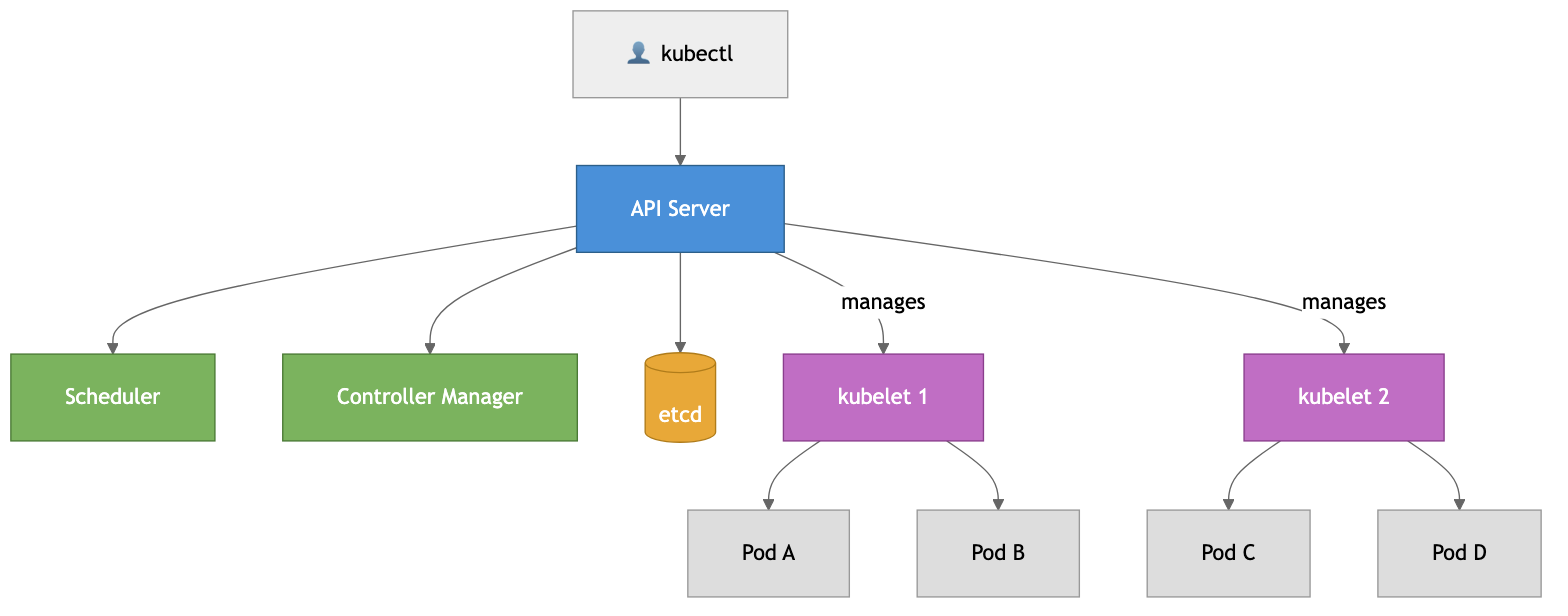
Control Plane components:
- API Server — the front door. Everything goes through it — kubectl, dashboards, internal components
- etcd — distributed key-value store that holds ALL cluster state. The single source of truth
- Scheduler — watches for new pods without a node and assigns them based on resources and constraints
- Controller Manager — runs loops that constantly push current state toward desired state
Worker Node components:
- kubelet — agent on every node, ensures pods are running and healthy
- kube-proxy — handles network routing to the right pods
- Container Runtime — containerd or CRI-O (Docker is no longer used directly since K8s v1.24)
The Reconciliation Loop
This is the heart of Kubernetes. It works on a declarative model — you don’t say “run 3 copies.” You say “I want 3 copies running.” K8s then constantly works to make reality match:
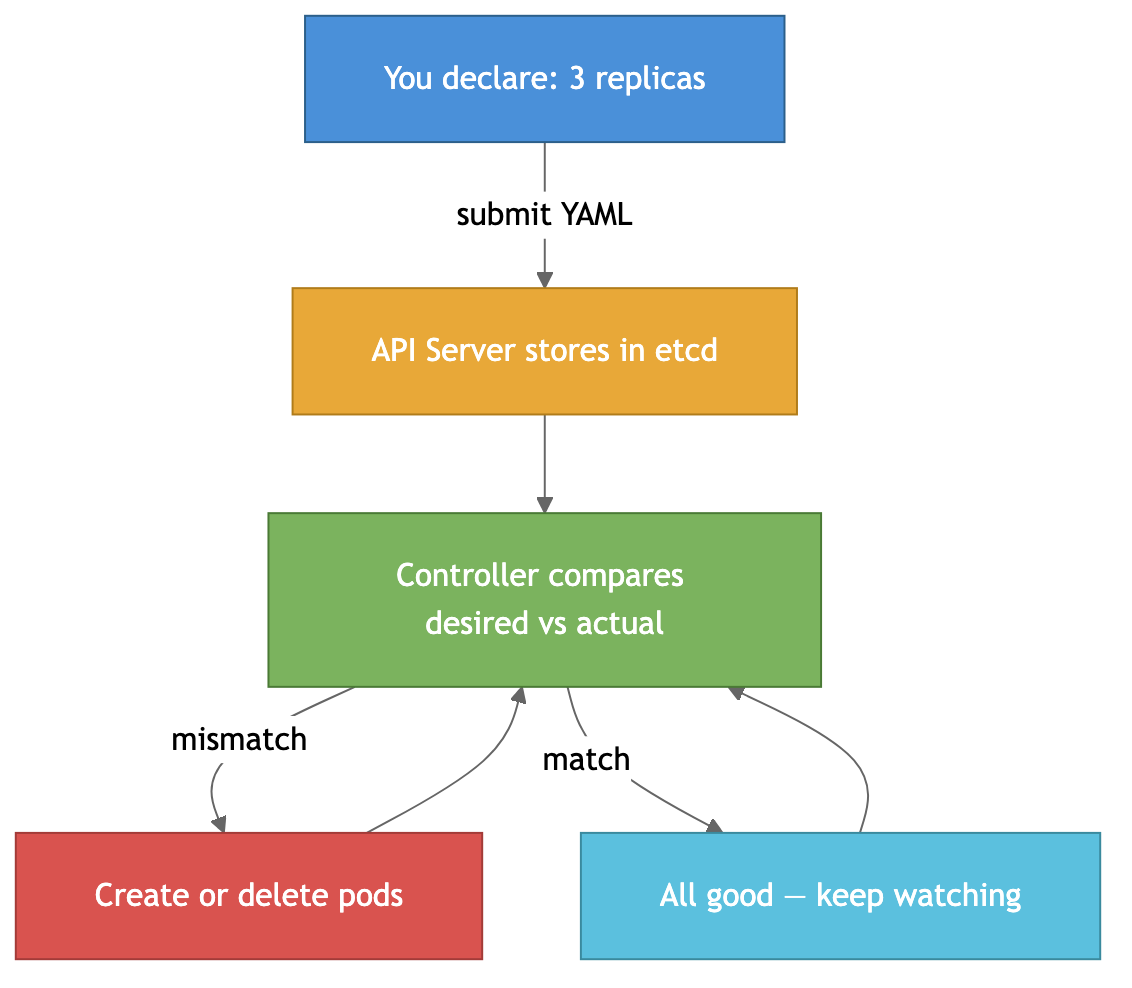
One pod crashes? Controller notices only 2 exist, creates a new one. Back to 3. All automatic. This is what makes K8s powerful — you describe the what, not the how.
Core Concepts
Pod — the smallest unit. Wraps one or more containers sharing the same network and storage. Most of the time, one pod = one container. You almost never create Pods directly — use Deployments.
Deployment — manages a set of identical Pods. Handles replicas, rolling updates, and rollbacks.
Service — since Pods are ephemeral (created and destroyed constantly), a Service provides a stable IP and DNS name that routes traffic to the right Pods. Four types: ClusterIP (internal only, default), NodePort (exposes on each node’s IP), LoadBalancer (gets an external IP from your cloud provider), and ExternalName (maps to a DNS CNAME).
apiVersion: apps/v1
kind: Deployment
metadata:
  name: my-app
spec:
  replicas: 3
  selector:
    matchLabels:
      app: my-app
  template:
    metadata:
      labels:
        app: my-app
    spec:
      containers:
        - name: my-app
          image: my-app:1.0.0
          resources:
            requests:
              cpu: "100m"
              memory: "128Mi"
            limits:
              cpu: "500m"
              memory: "256Mi"
StatefulSet — like Deployment, but for databases and stateful apps. Gives stable names (my-db-0, my-db-1), stable persistent storage per pod, and ordered deployment/scaling. Use for PostgreSQL, Redis, Kafka, Elasticsearch.
DaemonSet — ensures one pod runs on every node. Perfect for log collectors (Fluentd), monitoring agents (Datadog), and network plugins.
Job/CronJob — for finite tasks. Jobs run to completion, CronJobs run on a schedule. Always set activeDeadlineSeconds and backoffLimit — otherwise zombie jobs run forever. For CronJobs, use concurrencyPolicy: Forbid for anything that modifies data to prevent race conditions.
Namespace — logical division of a cluster. Resource isolation, access control, network policies. Think of them as folders — production, staging, development.
ConfigMap & Secret — configuration and sensitive data. Important: Secrets are only base64-encoded by default, NOT encrypted. Anyone with API access can read them. Use Sealed Secrets, External Secrets Operator, HashiCorp Vault, or enable etcd encryption for real security.
Scaling: HPA, VPA, and Karpenter
HPA (Horizontal Pod Autoscaler) — adds more pods when CPU/memory goes up, removes them when it drops.
apiVersion: autoscaling/v2
kind: HorizontalPodAutoscaler
spec:
  scaleTargetRef:
    apiVersion: apps/v1
    kind: Deployment
    name: my-app
  minReplicas: 2
  maxReplicas: 10
  metrics:
    - type: Resource
      resource:
        name: cpu
        target:
          type: Utilization
          averageUtilization: 70
VPA (Vertical Pod Autoscaler) — adjusts CPU/memory of existing pods instead of adding more. Useful when you don’t know what resources your app actually needs. Don’t use HPA and VPA on the same metric — they’ll fight each other.
Karpenter — a smarter node autoscaler (originally AWS, now expanding to Azure). Instead of scaling predefined node groups, it provisions the exact right instance type based on pending pod requirements. Faster (seconds vs minutes), cheaper (picks the cheapest instance that fits), and consolidates underutilized nodes automatically. If you’re on AWS with varied workloads — Karpenter over Cluster Autoscaler, no question.
Networking: Ingress and Services
Getting traffic into your cluster is done through Ingress — two parts:
- Ingress Controller — the actual software (NGINX, Traefik, HAProxy). Usually one per cluster, sometimes two for public/internal split
- Ingress Resource — YAML that defines routing rules. One or more per namespace
apiVersion: networking.k8s.io/v1
kind: Ingress
metadata:
  name: my-ingress
  annotations:
    nginx.ingress.kubernetes.io/rewrite-target: /
spec:
  ingressClassName: nginx
  tls:
    - hosts:
        - myapp.example.com
      secretName: myapp-tls
  rules:
    - host: myapp.example.com
      http:
        paths:
          - path: /api
            pathType: Prefix
            backend:
              service:
                name: api-service
                port:
                  number: 80
          - path: /
            pathType: Prefix
            backend:
              service:
                name: web-service
                port:
                  number: 80
Gateway API is the successor to Ingress — supports TCP/UDP/gRPC routing, traffic splitting, header-based routing. It’s now GA and recommended for new setups.
Egress — outbound traffic from your pods. By default, pods can reach anything. Lock it down with Network Policies. Pro tip: when restricting egress, always allow DNS (port 53) to kube-system, otherwise pods can’t resolve any hostnames.
Persistent Storage
Pods are ephemeral — when they die, local data is gone. For databases and file storage, you need persistent volumes.
Three concepts: StorageClass (defines how storage is provisioned — “use AWS EBS gp3”), PersistentVolume (a piece of actual storage), PersistentVolumeClaim (a pod’s request for storage — “I need 50GB of fast SSD”).
apiVersion: v1
kind: PersistentVolumeClaim
metadata:
  name: postgres-data
spec:
  accessModes:
    - ReadWriteOnce
  storageClassName: fast-ssd
  resources:
    requests:
      storage: 50Gi
Access modes: ReadWriteOnce (one node, most common), ReadOnlyMany (multiple nodes read-only), ReadWriteMany (multiple nodes read-write — needs special storage like EFS or NFS).
OOM — The Most Common K8s Problem
When you see OOMKilled — the Linux kernel killed your container for exceeding its memory limit. Exit code 137 (128 + SIGKILL).
Two key settings: requests (minimum guaranteed, used for scheduling) and limits (hard ceiling, exceed = killed). The gap between them determines your QoS class:
- Guaranteed (requests == limits) — last to be evicted
- Burstable (requests < limits) — medium priority
- BestEffort (no limits set) — first to be evicted. Never use in production
Common causes: limits set too low, memory leaks, JVM/runtime overhead, processing large payloads in memory.
# Debug OOM
kubectl top pod my-pod                              # actual usage
kubectl describe pod my-pod | grep -A 3 Limits      # what limits are set
kubectl get events --field-selector reason=OOMKilling # OOM events
Fix it: increase limits if genuinely needed, fix memory leaks (pprof for Go, heap dumps for Java), set proper JVM flags (-XX:MaxRAMPercentage=75), or use VPA to auto-tune resources.
RBAC and Security
RBAC (Role-Based Access Control) controls who can do what in your cluster. Four objects: Role (permissions in a namespace), ClusterRole (permissions cluster-wide), RoleBinding and ClusterRoleBinding (assign roles to users/groups/service accounts).
# Allow reading pods in production namespace
apiVersion: rbac.authorization.k8s.io/v1
kind: Role
metadata:
  namespace: production
  name: pod-reader
rules:
  - apiGroups: [""]
    resources: ["pods", "pods/log"]
    verbs: ["get", "list", "watch"]
Security essentials: enable RBAC (default on managed K8s), use Network Policies (don’t let all pods talk to all pods), scan images with Trivy or Snyk, don’t run as root (runAsNonRoot: true), use dedicated service accounts with minimal permissions, encrypt secrets at rest, and keep K8s updated.
Helm and GitOps
Helm is the package manager for Kubernetes. Instead of managing dozens of raw YAML files, you use charts — templated packages that bundle all the resources for an application.
helm repo add bitnami https://charts.bitnami.com/bitnami
helm install my-postgres bitnami/postgresql --set auth.postgresPassword=secret
You can create your own charts for your apps, with values.yaml files per environment. Way better than copy-pasting YAML across staging and production.
Argo CD is the most popular GitOps tool for K8s. The idea: your Git repo is the single source of truth for your cluster state. Push a change to Git, Argo CD detects the diff and syncs your cluster automatically. No more kubectl apply from someone’s laptop.
This combo — Helm for packaging, Argo CD for delivery — is the standard setup for production K8s deployments.
Common Mistakes
A few things I’ve seen go wrong repeatedly:
- No resource limits — a single pod can eat all node memory and take down everything else with it
- Using
latesttag — you lose track of what’s deployed, rollbacks break, and you can’t reproduce issues - No liveness/readiness probes — K8s can’t tell if your app is actually healthy or just running
- Secrets in Git — even base64-encoded. Use Sealed Secrets or external secret managers
- Skipping Network Policies — by default all pods can talk to everything. Lock it down
- Not setting Pod Disruption Budgets — during node drains, all your pods could be evicted at once
- Ignoring resource requests — the scheduler can’t make good placement decisions without them
When to Use K8s (and When Not To)
Use it when: multiple microservices, auto-scaling needs, high availability requirements, multi-environment deployments, multi-cloud strategy.
Don’t use it when: simple app or monolith, small team without K8s experience, simpler alternatives work (ECS, Cloud Run, Fly.io), cost matters a lot for small workloads.
Rule of thumb — if you can count your containers on two hands and they run on 1-2 servers, you probably don’t need Kubernetes.
Managed vs Self-Managed
For production, go managed. GKE has the best K8s experience (Google created K8s, and it shows). EKS for AWS shops (~$73/mo per cluster). AKS is free and integrates well with Azure AD. DigitalOcean/Civo for small teams on a budget.
Don’t want to manage nodes at all? GKE Autopilot or AWS Fargate — pay per pod, no nodes to worry about. More expensive per compute unit, but saves operational effort.
For self-managed (hard mode): kubeadm is the official tool, kOps automates setup on AWS, Rancher/RKE2 adds a management UI. Only go this route if you have strong infrastructure experience.
kubectl Cheat Sheet
# Basics
kubectl get pods                          # list pods
kubectl get all --all-namespaces          # everything across all namespaces
kubectl describe pod my-pod               # detailed info + events
kubectl logs my-pod -f                    # stream logs
kubectl logs my-pod --previous            # logs from crashed instance
kubectl exec -it my-pod -- /bin/sh        # shell into a pod

# Debugging
kubectl top pods                          # resource usage
kubectl get events --sort-by=.lastTimestamp # recent events
kubectl port-forward my-pod 8080:8080     # local access to a pod

# Cluster management
kubectl config get-contexts               # list clusters
kubectl config use-context prod-cluster   # switch cluster
kubectl cordon node-1                     # prevent new pods on node
kubectl drain node-1 --ignore-daemonsets  # evict pods for maintenance
kubectl uncordon node-1                   # re-enable node
Summary
Kubernetes is the standard for container orchestration — placement, self-healing, scaling, service discovery. The reconciliation loop (desired vs actual state) is the core idea that powers everything. Core objects: Pods, Deployments, Services, StatefulSets. Scale with HPA/VPA/Karpenter. Route traffic with Ingress or Gateway API. Package with Helm, deploy with Argo CD.
The downsides are real — complexity, YAML hell, networking headaches, debugging pain. Don’t reach for K8s when simpler tools would do. But when you genuinely need it, nothing else comes close.
More detailed notes with all deep dives (service mesh, operators, Karpenter configs, network policies, secret management), full YAML examples, and interview questions:
https://github.com/sadensmol/learning_system-design/blob/main/kubernetes-guide.md
Thanks for reading! More system design topics coming in the next parts of the series.
PS: are you running K8s in production? Managed or self-hosted? What’s been your biggest pain point? I’d love to hear what tools and patterns are working for you!