Learning System Design #5: Understanding PostgreSQL Locks
Fifth part of the “Learning System Design” series! This time we’re going deep into PostgreSQL locks — the thing nobody thinks about until their production database grinds to a halt because someone ran an ALTER TABLE on a busy table at peak hours.

Locks are the mechanism PostgreSQL uses to coordinate concurrent access to the same data. Every SELECT, UPDATE, INSERT, DELETE, ALTER TABLE — they all take some kind of lock. Most of the time you never notice because PostgreSQL handles it automatically. But when something goes wrong — a migration blocks all traffic, a deadlock kills transactions, or an idle connection holds a lock for hours — you really need to understand how this works.
Three Families of Locks
PostgreSQL has three distinct lock families:
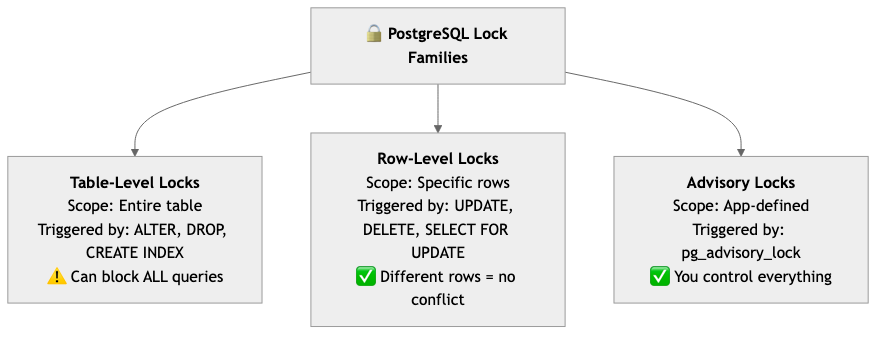
Table Locks: Why ALTER TABLE Is Scary
There are 8 table lock modes ranging from ACCESS SHARE (weakest, used by SELECT) to ACCESS EXCLUSIVE (strongest, used by ALTER TABLE, DROP, TRUNCATE). The key insight is the conflict matrix — which locks can coexist and which block each other.
The important rules:
SELECTnever blocksSELECTSELECTnever blocksINSERT/UPDATE/DELETEINSERT/UPDATE/DELETEnever block each other at the table level (row locks handle conflicts)ACCESS EXCLUSIVEblocks everything — evenSELECT
That last point is where the real trouble starts. Here’s the scenario that has ruined many engineers’ evenings:
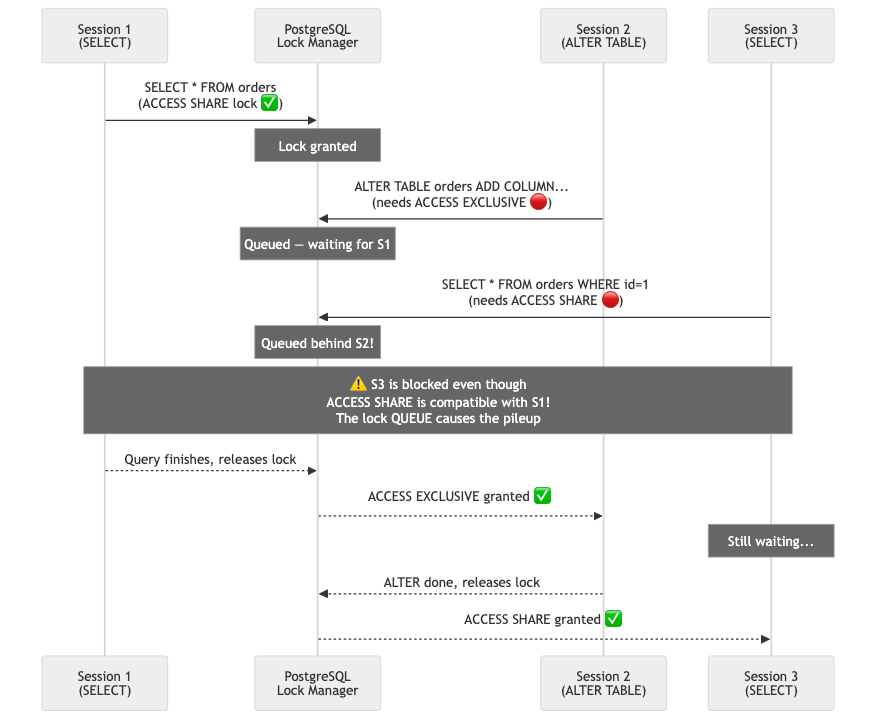
A slow report query is running. You deploy a migration with ALTER TABLE orders ADD COLUMN status VARCHAR(20). It needs ACCESS EXCLUSIVE, so it waits for the report to finish. Reasonable. But now every new query — even tiny fast SELECTs — queues behind your ALTER. One migration creates a traffic jam for the entire table. Your API starts timing out. Alerts fire.
The fix? Always set lock_timeout before DDL:
SET lock_timeout = '3s';
ALTER TABLE orders ADD COLUMN status VARCHAR(20);
If it can’t get the lock in 3 seconds, it fails instead of building a queue. Retry with exponential backoff.
Row Locks: The Daily Workhorse
Row locks are what you deal with 99% of the time. Four modes: FOR KEY SHARE, FOR SHARE, FOR NO KEY UPDATE, FOR UPDATE — from weakest to strongest.
The most important pattern is SELECT FOR UPDATE — the classic “check-then-act”:
-- WRONG: race condition!
BEGIN;
SELECT available FROM seats WHERE id = 42;        -- reads: true
-- another session grabs it RIGHT HERE
UPDATE seats SET available = false WHERE id = 42;  -- oops, double booking
COMMIT;

-- RIGHT: lock the row first
BEGIN;
SELECT available FROM seats WHERE id = 42 FOR UPDATE;  -- locks the row
UPDATE seats SET available = false WHERE id = 42;       -- safe
COMMIT;
Without FOR UPDATE, two sessions can read available = true simultaneously and both book the same seat. With it, the second session waits until the first commits.
Two more tools you should know:
SKIP LOCKED — for job queues. Multiple workers grab tasks without blocking each other. If a row is locked, skip it and grab the next one:
SELECT * FROM tasks WHERE status = 'pending'
ORDER BY created_at LIMIT 1
FOR UPDATE SKIP LOCKED;
NOWAIT — fail immediately instead of waiting. Great when you’d rather show “resource busy, try again” than make the user stare at a spinner:
SELECT * FROM seats WHERE id = 42 FOR UPDATE NOWAIT;
-- ERROR if locked: could not obtain lock on row
Deadlocks: The Circular Wait
A deadlock happens when two transactions each hold a lock the other needs. Session 1 has row 1 and wants row 2. Session 2 has row 2 and wants row 1. Neither can proceed.
-- Session 1                          -- Session 2
BEGIN;                                BEGIN;
UPDATE accounts SET balance = 100     UPDATE accounts SET balance = 200
WHERE id = 1;                         WHERE id = 2;

UPDATE accounts SET balance = 300     UPDATE accounts SET balance = 400
WHERE id = 2;   -- WAITS              WHERE id = 1;   -- DEADLOCK!
PostgreSQL detects deadlocks automatically (checks every deadlock_timeout, default 1 second), picks a victim, and aborts it with ERROR: deadlock detected. The other transaction continues.
Prevention is simple: always lock rows in the same order. If both sessions lock row 1 first, then row 2 — no circular dependency possible. Use ORDER BY id with SELECT FOR UPDATE when locking multiple rows.
Advisory Locks: Your Custom “Reserved” Sign
Advisory locks are perfect for application-level coordination that doesn’t map to specific rows or tables:
-- Prevent duplicate cron jobs
SELECT pg_try_advisory_lock(12345);
-- Returns true → run the job; false → another instance is running

-- Coordinate migrations across app servers
BEGIN;
SELECT pg_advisory_xact_lock(hashtext('db-migration'));
-- Only one server runs migrations at a time
COMMIT;  -- lock auto-released
One big gotcha: session-level advisory locks (pg_advisory_lock) survive COMMIT and ROLLBACK. They stay until you explicitly unlock or disconnect. Prefer pg_advisory_xact_lock — it auto-releases on transaction end.
Safe Migration Patterns
This is where lock knowledge really pays off in practice. Here’s what you need to know:
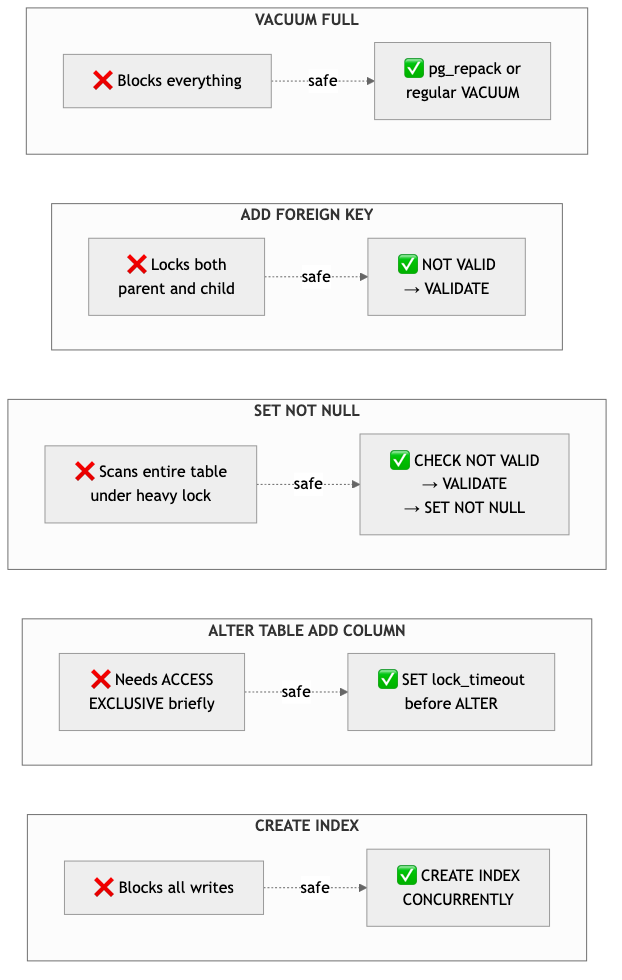
The pattern is always the same: split heavy operations into light steps. Don’t scan the table while holding the strongest lock. Add the constraint as NOT VALID (instant), then validate it separately (scans with a lighter lock).
Troubleshooting: Finding and Fixing Lock Issues
When your queries are stuck, here’s the diagnostic query you need:
SELECT
    blocked.pid AS blocked_pid,
    blocked.query AS blocked_query,
    age(clock_timestamp(), blocked.query_start) AS waiting_duration,
    blocker.pid AS blocker_pid,
    blocker.query AS blocker_query
FROM pg_stat_activity AS blocked
JOIN LATERAL (
    SELECT * FROM pg_stat_activity
    WHERE pid = ANY(pg_blocking_pids(blocked.pid))
) AS blocker ON true
WHERE blocked.wait_event_type = 'Lock';
Found the blocker? If it’s an idle-in-transaction session (someone forgot to COMMIT) — kill it with SELECT pg_terminate_backend(<pid>). If it’s a long-running migration — decide whether to wait or cancel.
Prevention settings that every production database should have:
SET lock_timeout = '5s';                              -- don't wait forever for locks
SET idle_in_transaction_session_timeout = '5min';      -- kill forgotten transactions
SET log_lock_waits = 'on';                             -- log lock waits for post-mortem
Summary
PostgreSQL locks are mostly invisible — until they’re not. The key takeaways:
- Table locks are the dangerous ones. ACCESS EXCLUSIVE (ALTER TABLE, DROP, TRUNCATE) blocks everything, including SELECT. Always use
lock_timeout. - Row locks are fine. They only block other operations on the same row. Use
FOR UPDATEfor check-then-act,SKIP LOCKEDfor queues,NOWAITfor fail-fast. - Deadlocks are preventable. Lock rows in consistent order. Keep transactions short.
- Migrations need care. Use
CONCURRENTLYfor indexes,NOT VALID + VALIDATEfor constraints, and always set lock timeouts.
More detailed notes with conflict matrices, all 8 lock modes explained, and ready-to-use monitoring queries:
https://github.com/sadensmol/learning_system-design/blob/main/postgres-locks-guide.md
Thanks for reading! More system design topics coming in the next parts of the series.
PS: ever had a production incident caused by locks? ALTER TABLE on a hot table during peak hours? I’d love to hear your war stories!